Label Studio
Label Studio is an open-source data labeling tool designed to facilitate the annotation of various data types such as text, images, audio, and video. It provides an intuitive interface for creating and managing datasets while supporting a wide range of label types, including classification, transcription, and object detection. Label Studio allows teams to annotate data collaboratively, enhancing productivity and model accuracy for machine learning projects.
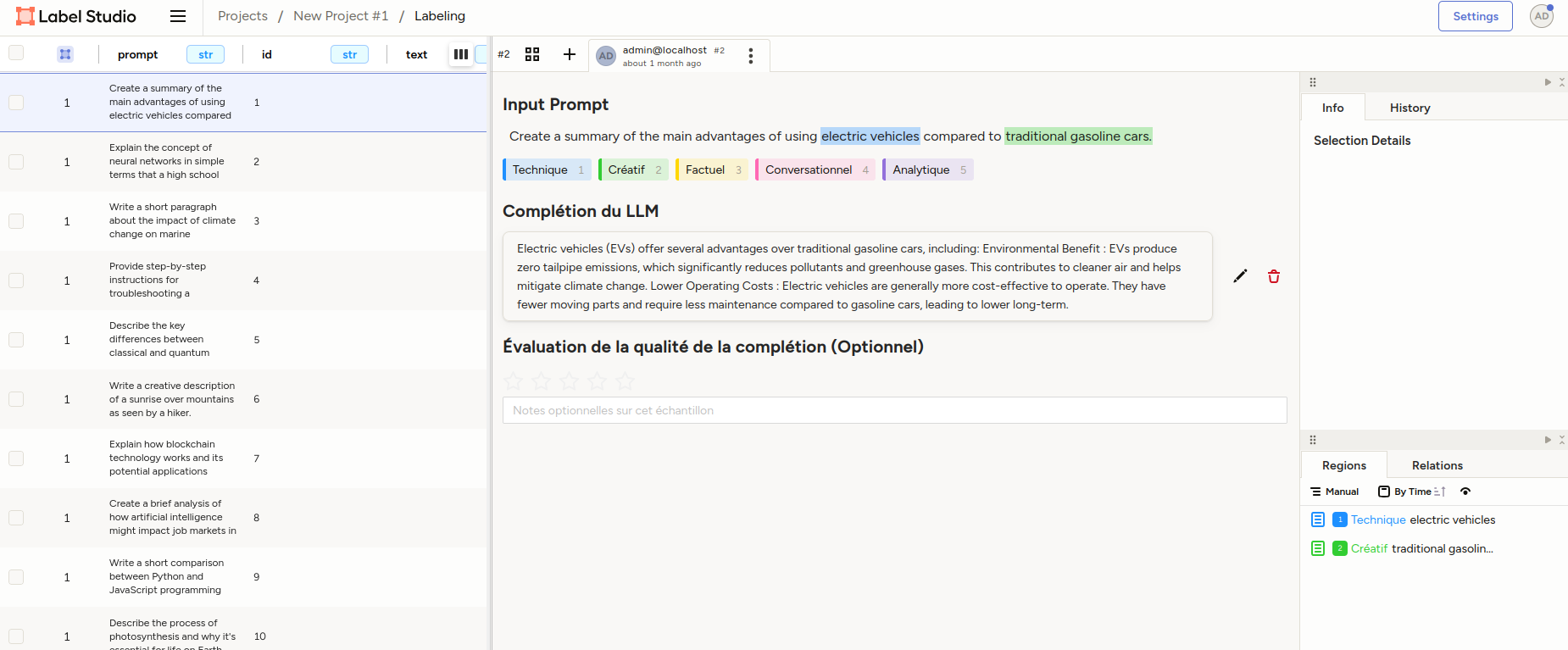
Using Label Studio
To use Label Studio, follow these steps:
Create a New Project
- Navigate to the Label Studio web interface.
- Click on the "Create Project" button.
- Choose the type of labeling task (e.g., text classification, object detection, etc.).
- Configure your Cloud Storage source and target, from example, select an AWS S3 Storage type.
Label the Data
- Start labeling by selecting items from your uploaded dataset.
- Use the tools provided by Label Studio to annotate the data according to your project's needs.
Export the Annotations
Once the annotations are complete, the labeled data are sync into your Target Cloud Storage (S3 usually) for further processing or model training.
References
- Official Label Studio Documentation: https://labelstud.io
- GitHub Repository: https://github.com/heartexlabs/label-studio
- Label Studio API Reference: https://labelstud.io/guide/api.html
- Label Studio for Machine Learning: https://labelstud.io/guide/usage.html